How to fix a photo taken mid-word or mid-bite
Open mouth, food at the lips, a hand in the way: fix the photo that caught you mid-sentence or mid-bite with Expression Editor - Reshot AI.
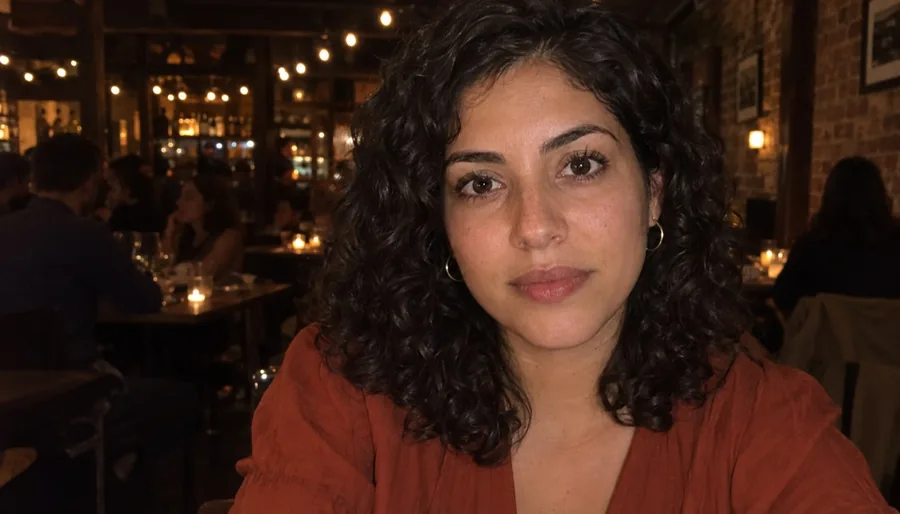
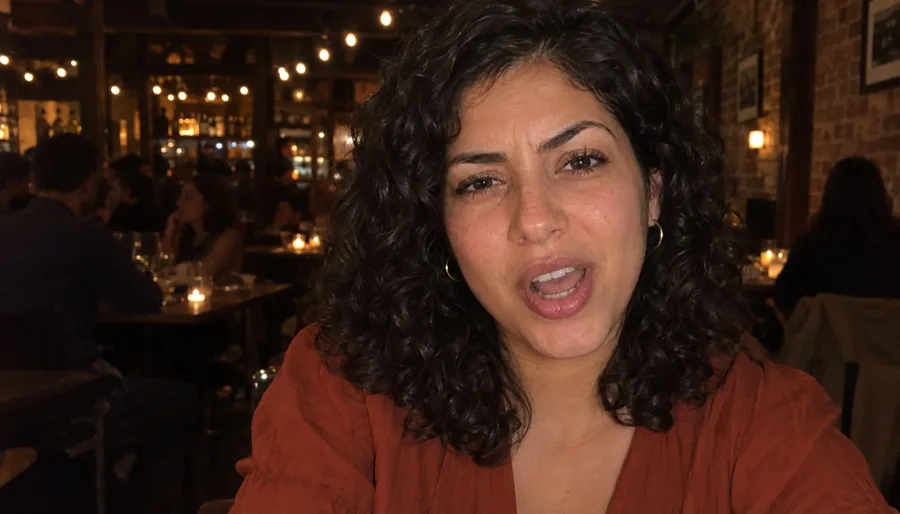
Open the photo in Expression Editor - Reshot AI and tap Fix Everything. It closes a mouth caught mid-word, moves food, a drink or a hand away from the mouth, and gives several versions with a natural smile. To close the mouth by hand, use the Smile tool's mouth slider.
Why this happens so often
People talk, laugh and eat at exactly the moments worth photographing: dinners, parties, holidays. Phones take the photo a moment after you press, and a mouth that was closed a moment ago is open in the picture.
What the app can fix
- Mouth open: closed into a soft, relaxed smile.
- Mid-bite: food, a drink or a hand at the mouth is moved away, with a natural smile.
- A hand on the face or a phone in the way: moved out.
- A stiff or forced smile: relaxed.
By hand, with sliders
The Smile tool can add, soften or remove a smile and open or close the mouth. Use it when the expression is nearly right and you only want the mouth a little more closed.
Step by step
Open the photo
In Expression Editor - Reshot AI, pick the photo.
Tap Fix Everything
Or tap the person and use the Smile tool for a small change.
Pick a version
Versions differ in expression, from a soft smile to a light laugh.
Save
Compare with the original and save.
Try it on your own photo
Download Expression Editor - Reshot AI on the App Store.
Questions
Will it remove the food from the plate too?
No. Fix Everything moves food or a drink away from the mouth; the rest of the table stays as it was.
Can it close the mouth without adding a smile?
Use the Smile tool by hand: it can close the mouth and soften or remove the smile.